
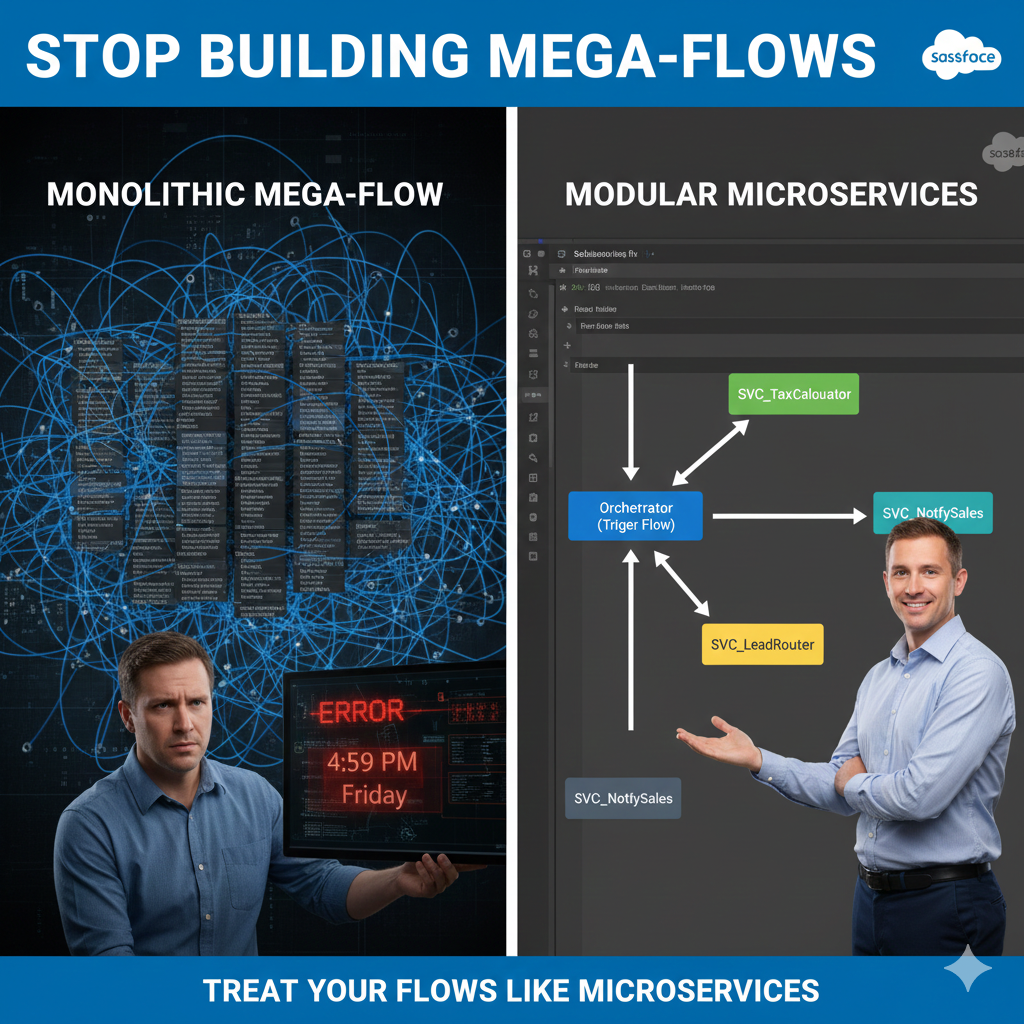
The year is 2026, and the Salesforce Flow Builder has matured into the undisputed engine of the modern enterprise. It is more powerful than ever, now capable of executing complex logic that once required thousands of lines of Apex code. However, this evolution has birthed a new challenge for architects: the “Great Spaghetti Monster.”
Picture this: It’s 4:30 PM on a Friday. An automated “Flow Application Error” email hits your inbox. You click the link, and Flow Builder opens a canvas so vast you must zoom out to 10% just to see the start and end elements. It looks less like a business process and more like a digital map of a major metropolitan subway system. There are 150 elements, 30 divergent decision branches, and variables with cryptic names like var_Variable1_old_v2.
You didn’t build this Flow. The architect who did left the company six months ago. Now, you hesitate to touch even a single decision node. You fear that a minor change to the “Lead Assignment” logic might—for some inexplicable reason—shatter a Slack notification sent to the Finance team.
This is the Monolithic Flow, often referred to as the “Mega-Flow.” It is brittle, unmanageable, and serves as a ticking time bomb of technical debt. In this guide, we will explore a more sophisticated approach. By borrowing a foundational principle from software engineering, we can apply the Single Responsibility Principle (SRP) to Salesforce. We are going to learn how to dismantle the “Mega-Flow” and start treating our automation as a suite of agile, reusable Microservices.

I. Understanding the Philosophy: What is a “Flow Microservice”?
To modernize our automation, we must first understand the philosophy of Microservices. In traditional software development, a microservice is a small, independent unit of code that performs exactly one task—and does it with precision. These services communicate with one another to complete a larger, more complex process. Because they are “loosely coupled,” you can modify the logic inside one service without inadvertently breaking the others.
When we apply this to the Salesforce platform, we pivot away from the giant, all-encompassing Record-Triggered Flow. Instead, we divide our automation into two distinct, specialized roles:
1. The Orchestrator (The Strategic Brain)
The Orchestrator is typically your Record-Triggered Flow or Schedule-Triggered Flow. It acts as the “Traffic Controller,” managing the logic path and the timing. It answers two vital questions:
- “When should this run?” (e.g., Only when an Opportunity transitions to “Closed-Won”).
- “What steps need to happen?” (e.g., 1. Calculate Tax, 2. Create Invoice, 3. Notify Sales).
Crucially, the Orchestrator does not perform the heavy lifting. It doesn’t query external databases or perform complex mathematical transformations directly. It simply calls the experts.
2. The Worker (The Tactical Muscle)
The Worker is an Autolaunched Flow utilized as a Subflow. This is your “Microservice.” It adheres to the SRP by having one, and only one, responsibility. It is indifferent to whether it was triggered by an Opportunity, a Case, or a Custom Object. It simply waits for inputs, performs its specific calculation, and hands back a clean output.

II. The “Mega-Flow” Tax: Why Monoliths Fail at Scale
Many organizations resist refactoring because “it works for now.” However, the Total Cost of Ownership (TCO) of a Mega-Flow is significantly higher than a modular system when you look at the long-term lifecycle of an organization.
1. The Maintenance Tax
When a Mega-Flow grows, the time required to make a simple change increases exponentially. A 10% increase in complexity often results in a 50% increase in testing time. This is because the “Impact Surface Area” of a Mega-Flow is massive. You cannot change the “Commission Calculation” without worrying about how it affects the “Renewal Opportunity” logic sharing the same canvas.
2. The Collaboration Barrier
Only one person can edit a Flow at a time. If you have a team of three Admins and all your logic is contained within one “Opportunity Master Flow,” your team is constantly bottlenecked. In a Microservices architecture, Admin A can optimize the Subflow: Tax_Calculator while Admin B builds the Subflow: Contract_Generator. Modularity enables parallel development and faster deployment cycles.
3. The Cognitive Load
For a new hire, opening a 200-element Flow is overwhelming. It can take weeks to fully “map” the logic in their head. A Microservice architecture, conversely, is self-documenting. If a new Admin needs to understand how tax is calculated, they simply open the SVC_TaxCalculator Flow. The scope is limited, the variables are few, and the logic is transparent.
III. Technical Deep Dive: Subflows vs. Apex Invocable Methods
A common question for architects in 2026 is: “When should this Subflow actually be an Apex Invocable Method?” While Flow is more capable than ever, the “Microservice” approach helps identify the hand-off point.
Because you are using a modular architecture, the Orchestrator doesn’t care whether the Worker is a Subflow or an Apex class. This is the beauty of Encapsulation: the “What” remains the same, even if the “How” changes from Flow to Code.
| Feature | Subflow (Microservice) | Apex Invocable Method |
| Builder Type | Declarative (Low-Code) | Programmatic (Pro-Code) |
| Maintenance | High accessibility for Admins | Requires Developer / Deployment |
| Performance | Good for standard logic | Superior for large collections/loops |
| Complex Logic | Can become messy with loops | Handles complex maps/sets easily |
| Error Handling | Uses Fault Paths | Uses Try/Catch Blocks |
The Architect’s Rule: If your logic requires complex list processing (like comparing two large collections) or high-volume SOQL queries with specific offsets, swap the Subflow for an Apex action.
IV. Building the “Round Robin” Service: A Reusable Blueprint
Let’s look at a practical, high-value example: The Round Robin Lead Assignment Service. Traditionally, Admins build this logic specifically for Leads. But in a Microservices model, we build it to work for any record type.
Step 1: The Contract (Inputs/Outputs)
Our “Round Robin” Worker needs to know:
- Input:
col_UserGroup(A collection of Users eligible for assignment). - Input:
var_LastAssignedUserId(To know where we left off). - Output:
var_NextUserId(The winner of the record).
Step 2: The Logic
The Subflow doesn’t need to know it’s a “Lead.” It simply takes the list of users, finds the next person in line, and returns that ID to the Orchestrator.
Step 3: Implementation
Now, you can call this same service from your Lead Flow, your Case Flow, and your Task Flow. You’ve solved the assignment problem once for the entire company.

V. Governance: Managing the “Matryoshka” Effect
While modularity is the goal, architects must be wary of the “Russian Nesting Doll” trap—where a Subflow calls a Subflow, which calls another Subflow, six levels deep. This is known as the Matryoshka Effect.
Architectural Best Practices:
- Strict Nesting Limits: Aim for a maximum depth of 2 levels (Trigger Flow → Subflow → Utility Subflow). Any deeper, and the “Stack Trace” becomes difficult to follow in debug logs.
- Naming Conventions: Standardize your library immediately.
RTF_(Record-Triggered Flow)SUB_orSVC_(Functional Subflow – business logic)UTIL_(Utility Subflow – error logging, formatting)
- The Description Field is Mandatory: In a Microservices world, the description is your documentation. It must define the “Contract”: “This service accepts a UserID and returns a Boolean indicating if they are a member of the ‘Senior SDR’ commission group.”
VI. Performance Monitoring with Flow Trigger Explorer
In 2026, the Flow Trigger Explorer is your best friend. It allows you to see the execution order of all your Orchestrators. By using a Microservices approach, your Trigger Explorer becomes a clean dashboard of “Entry Points.”
Instead of seeing one massive “Lead After-Save Flow” that takes 4 seconds to run, you see a series of small, efficient calls. This allows you to monitor CPU Time more effectively. If the SVC_TaxCalculator is causing performance bottlenecks, you can optimize that one Subflow (or move it to Apex) without touching the rest of the Lead logic.
VII. The Refactoring Roadmap: How to Dismantle a Mega-Flow
You likely already have a Mega-Flow in production. You cannot simply delete it and start over. You need a phased migration strategy.
Phase 1: The “Audit”
Export your Mega-Flow as a PDF or high-res image. Identify “Pockets of Logic” that are repeated or handle a distinct business rule. The “Global Error Handler” or a “Discount Calculation” are perfect candidates for your first extraction.
Phase 2: The “Service Creation”
Build the Subflow in isolation. Test it thoroughly with various inputs to ensure it is robust and object-agnostic.
Phase 3: The “Swap and Test”
Replace the complex logic block in your Mega-Flow with a single “Subflow” element. Use Flow Versions to your advantage. Keep the old version as a fallback, and run the new version in a Sandbox with full regression testing.
Phase 4: Iterate
Repeat this process once a month. Over time, your Mega-Flow will shrink until it is nothing more than a clean, readable Orchestrator that calls 5 or 6 high-performing services.
VIII. Conclusion: Moving from Admin to Architect
The transition from building Mega-Flows to Microservices is more than a technical adjustment; it is an evolution in professional identity. It marks the moment you stop being a reactive “Accidental Admin” and start being a Salesforce Architect who engineers sustainable, enterprise-grade systems.
As we move deeper into 2026, the complexity of the Salesforce ecosystem will only continue to accelerate. Features like Data Cloud, AI-driven Einstein actions, and complex multi-org integrations are becoming the standard, not the exception. In this high-stakes environment, the “Mega-Flow” isn’t just a nuisance—it’s a liability that prevents your business from being agile.
By adopting the Single Responsibility Principle, you are effectively future-proofing your Salesforce org. You ensure that when business requirements pivot, or when Salesforce introduces a new platform feature, you won’t be forced to rebuild your entire infrastructure. Instead, you will simply swap out a few “Lego bricks.”
The Challenge: Look at your most complex Flow on Monday morning. Don’t try to fix the whole thing at once. Identify just one recurring piece of logic—perhaps a complex formula or a specific notification—and extract it into its own Subflow. Start small, build your library of services, and watch your technical debt disappear.
Leave a Reply